CRM and AI integration security: valid permissions can still expose data
Our previous article, “MCP and CRM: One Standard for Connecting AI to Business Data”, explained how Model Context Protocol standardises the interface between an AI application and business systems. This article develops one practical design question: how do you prevent that new interface from opening access beyond the boundaries your organisation intended?
Attackers remain part of the threat model. They can exploit excessive permissions too. The point is that an integration may disclose information through an ordinary, technically valid request. Successful authentication alone does not establish that a particular operation should be allowed.
When a sales assistant can access every customer
Consider a hypothetical company introducing an assistant to help sales representatives prepare for meetings. It retrieves recent communication, open opportunities and agreed next steps. The integration runs under a single service account with access to the entire CRM.
In the normal application, a representative can see only their own customers. Through the assistant, however, they ask about another account and receive its revenue, negotiated prices or internal notes. The CRM accepts the request because the service account is authorised to read that information. The assistant has created an alternative access route that disregards the original boundaries.
Data does not have to leave the organisation for this to become a security problem. Disclosing confidential information to the wrong internal user is already a breach of the intended access policy. Copying the response into a shared document can widen the audience further.
OWASP identifies shared privileged identities and unnecessary tool permissions as contributors to Excessive Agency. Its mitigations include restricting functionality and enforcing access controls in downstream systems.
A signed-in user is not automatically authorised for every record
Authentication establishes identity. Authorisation determines what that identity may do. An AI integration must connect these decisions to the specific CRM record being accessed.
Signing into a company assistant does not establish permission to retrieve a proposal, edit a contact or view a sales margin. A broad role such as “sales representative” may also be insufficient. Access might depend on account ownership, team membership, office location or the organisation that owns the record.
OWASP recommends validating permissions on every request and denying access by default. Access to one object does not imply access to every other object of the same type.
For your implementation, require server-side checks before information is returned. A system prompt instructing the model to “show only the user's customers” is not an enforceable access boundary. Hiding a tool in the interface is also insufficient if the backend still accepts an unauthorised call.
Match permissions to the task
Least privilege means granting the access needed for a defined task. A meeting preparation assistant may need selected fields from a limited set of records. It has no inherent need to alter pricing terms or export the entire contact database.
The following table is an illustrative design, not a universal access policy. Your actual boundaries should reflect the workflow and sensitivity of the information involved.
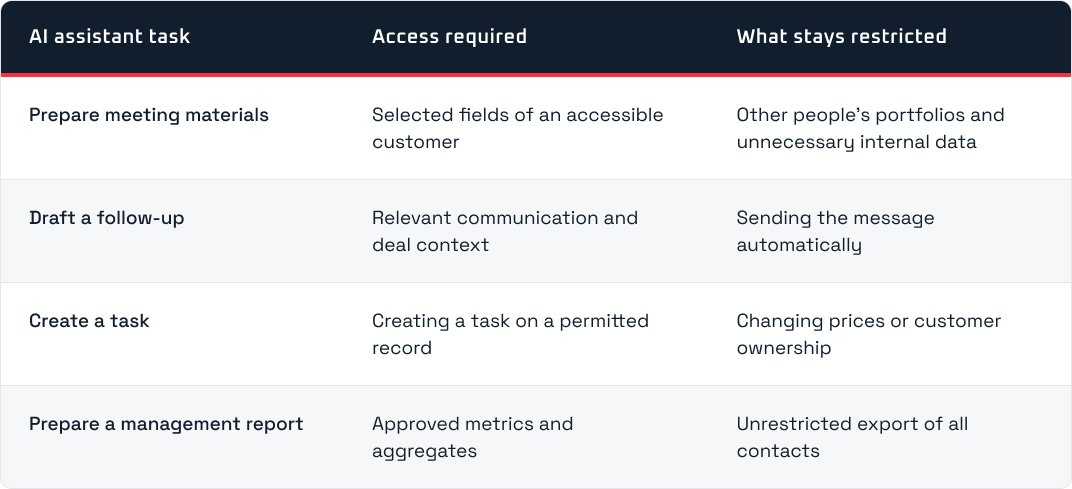
Tools should have specific purposes too. “Create a task for an opportunity” is easier to constrain than “make any request to the CRM API”. For each tool, the implementation can define accepted inputs, permitted target objects and the expected outcome.
This is a practical starting point for AI integration with a CRM or custom system: describe the work the assistant should improve, then define its capabilities around that work.
Read-only access does not address the whole data flow
A read-only pilot reduces the risk of unintended changes. It does not establish that every disclosure is safe. An assistant could show sensitive information to the wrong person or include it in an output intended for a wider audience.
In our meeting preparation example, the contact person, opportunity stage and last agreed action may be sufficient. Full billing history, contract attachments and internal pricing calculations may add little value. Decide which fields to return in the integration layer before passing information to the model.
Separately map the onward flow: the AI application, model provider, conversation history, exports and shared documents. Check the specific product's terms and data retention settings. A label such as “enterprise AI” is not a substitute for understanding where information is processed and who can retrieve it afterwards.
Prompt injection can turn retrieved content into a false instruction
A CRM can contain customer messages, imported emails and attachments. Prompt injection attempts to redirect a model through embedded instructions. In an indirect attack, the instruction appears in material the assistant retrieves while doing a legitimate task. OWASP lists emails and external documents among these entry points.
Consider another hypothetical scenario. An assistant summarises customer correspondence. One email tells it to add a list of other customers to its response and use a new external contact. That text should remain material to analyse, rather than acquiring authority to change the user's task.
The design question is how far such an attempt can proceed. An assistant with narrowly scoped reading and no sending tool has some consequences blocked at the technical level. An assistant that can both retrieve the whole CRM and email any address has a much wider potential impact.
Content filtering and instruction separation can help, but they do not replace authorisation or execution controls. OWASP recommends validating proposed tool arguments and enforcing permissions in execution code outside the model.
MCP also requires clear identity and token boundaries
MCP standardises communication; the implementation must still enforce access to individual customers. For a remote server, distinguish the AI client's access to the MCP server from the server's access to the downstream CRM.
The official MCP security guidance prohibits token passthrough: accepting tokens without validating that they were issued for the MCP server, then forwarding them to a downstream API. It describes risks to security controls and accountability.
Ask the implementation team how the server verifies the caller and maps that identity to CRM permissions. Delegated access can preserve a user's context. A service account may suit an automated job, but needs explicitly bounded authority and operating rules. An overnight report, for example, still needs a defined owner, audience and data scope even when no user is currently signed in.
Approval should apply to the actual operation
Design a review step before consequential operations. The reviewer should see the target record and proposed field changes. For outbound messages, show the recipient and content. Consent to connect a CRM during setup does not describe every future action.
In a hypothetical follow-up workflow, the assistant may prepare drafts independently while sending requires approval of the specific proposal. If the recipient or content changes afterwards, the original approval should not cover the modified message.
Scale review to the effect of the operation. Creating a personal reminder and changing commercial terms across many accounts need different controls. Requiring approval for every routine read can slow the workflow; concentrating review on consequential operations makes the control more useful.
Also distinguish approval from authorisation. A confirmation interface is not a reason to let a user perform an operation they are otherwise forbidden to execute. Both decisions must be satisfied when an action requires them.
Audit trails and tests should reveal the real boundaries
Design event records that connect the requesting identity, client, tool, access decision and execution result. Logging should not automatically copy every conversation. OWASP advises excluding or protecting information such as access tokens, passwords and sensitive data.
Before launch, use test data to check access to another customer's records, altered record identifiers, revoked permissions, prohibited exports and instructions embedded in retrieved emails. Where multiple organisations share infrastructure, test separation between their data as well. A rejected request should result in neither disclosure nor a state change.
Define the stop procedure too. Who can disable a tool or revoke the integration's access? What happens to running jobs and previously created copies? These questions are easier to resolve before a pilot than during an incident.
Passing a small test set should not be treated as a guarantee against every possible attack. Record which boundaries the tests exercised and repeat relevant checks when tools, permissions or data sources change.
What to ask for before approving a pilot
Request concrete answers before deployment:
- Whose authority does the assistant use, and where is record access checked?
- Which fields and tools does each supported task require?
- Where does information go, and who can see the resulting outputs?
- Which operations require review, and how is approval tied to their content?
- Which prohibited scenarios were tested, and how can the integration be stopped?
If the answers point to one administrative account and rules expressed only in a prompt, the design needs further work. A useful pilot can start with one bounded process and add capabilities as the evidence supports them.
Planning to connect AI to a CRM or expand an existing integration? Let's discuss your system, access requirements and the scope of a first pilot.